3D Nativity Scene Shadow Box SVG: Creative and Practical Uses for Holiday Crafting
When the holiday season rolls around, many crafters find themselves looking for fresh, meaningful ways to celebrate. Enter the 3D Nativity Scene Shadow Box SVG, a digital design that brings the classic Christmas story into your crafting projects with stunning depth and detail. This design is more than just a festive pattern—it's a versatile tool for creating personalized decorations, gifts, and displays that capture the spirit of the season.
What Is a 3D Nativity Scene Shadow Box SVG?
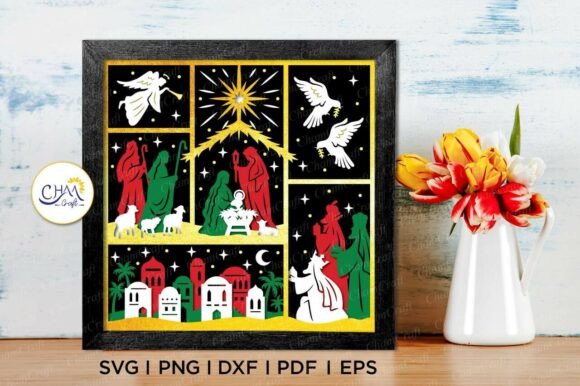
A 3D Nativity Scene Shadow Box SVG is a layered digital file designed specifically for use with cutting machines like Cricut or Silhouette. It includes multiple layers that, when assembled, create a three-dimensional effect within a shadow box format. The result? A beautiful, eye-catching piece that can be displayed on its own or incorporated into other creative projects.
This particular design measures 8×8 inches, making it ideal for desktop-sized crafts. While it’s easy to resize, scaling down too much can make intricate details harder to cut accurately—something to keep in mind if you're working with delicate materials or small spaces.
Real-World Applications and Use Cases
The beauty of the 3D Nativity Scene Shadow Box SVG lies in its adaptability. Whether you're an experienced crafter or new to paper-cutting, there are countless ways to bring this design to life:
- Home Decor: Create a custom light box or shadow box display to hang on your wall. These pieces add warmth and a personal touch to any living room or entryway during the holidays.
- Gifts and Ornaments: Turn the design into a unique ornament for your tree or give it as a gift to friends and family. With some LED lighting, you can even make it glow!
- Church or Community Projects: Churches often look for meaningful decorations for their services or community events. This SVG can be used to craft elegant centerpieces or display items for nativity plays, Advent calendars, or seasonal bazaars.
- Businesses and Retailers: Boutique shops or online stores can use these designs to create limited-edition holiday items. Think custom cards, packaging inserts, or window displays that stand out and tell a story.
- Weddings and Events: For winter weddings or holiday-themed parties, the 3D elements can be integrated into table centerpieces, signage, or photo backdrops to add a sacred and timeless vibe.
Who Can Benefit from This Design?
Crafters across various skill levels and industries can benefit from the 3D Nativity Scene Shadow Box SVG. Here are some examples of how different users might apply it:
For the DIY Enthusiast
If you enjoy experimenting with colors, textures, and layering, this SVG gives you the freedom to do so. You can try different color combinations—think red and gold for a traditional feel or pastel tones for a softer aesthetic. Each variation changes the overall mood of the design, allowing you to tailor it to your personal style or home décor.
For Educators and Youth Leaders
Teachers and Sunday school leaders can use this design to engage children in hands-on learning. By helping students assemble the 3D scene, you're not only teaching them about the Nativity but also introducing basic concepts of design, art, and engineering. The tactile experience of building something by hand can make the story more memorable and impactful.
For Event Planners and Wedding Coordinators
Incorporate the 3D Nativity Scene Shadow Box SVG into holiday-themed events or winter weddings. These designs can be adapted into table runners, candle holders, or even interactive displays where guests can explore the scene up close. They’re especially effective in settings where storytelling through visuals is important.
For Small Business Owners
Shop owners selling handmade goods or holiday decorations can leverage this design to create exclusive products. The compatibility with popular cutting software means you can produce high-quality items efficiently. Pair the design with custom branding or packaging for a professional finish that customers will love.
How to Get Started with the 3D Nativity Scene Shadow Box SVG
Before diving in, there are a few practical considerations to keep in mind:
- Understand Your Tools: Make sure you're familiar with your cutting machine and software. If you're using Cricut Design Space or Silhouette Studio, take some time to review the interface and settings specific to SVG files.
- Material Selection: Choose the right type of paper or cardstock based on the complexity of the design. Thicker stock holds up better for 3D structures, while thinner materials may be easier to cut but less durable.
- Layer Assembly: Since the design is layered, plan ahead for how you’ll glue or attach each part. Using a bone folder or precision tools can help you achieve clean folds and sturdy construction.
- Lighting Options: Consider adding backlighting if you're making a light box. Battery-operated LED strips or fairy lights work well and are safe for indoor use.
Strengths and Limitations of the Design
One of the biggest strengths of the 3D Nativity Scene Shadow Box SVG is its ability to transform simple materials into something visually striking. The layered approach allows for a sense of depth and realism that flat designs simply can’t match. Additionally, because it’s available in multiple formats—including PNG, SVG, DXF, EPS, and PDF—you have flexibility depending on your workflow and equipment.
However, there are a few limitations to consider. First, since it’s a digital product, you need to know how to extract and open ZIP files. Second, the detailed nature of the design means that beginners may need to practice a bit before achieving perfect results. Lastly, as mentioned earlier, resizing the design too much can compromise the integrity of smaller components, which could lead to frustration if not handled carefully.
Getting Creative with Color and Texture
Color is one of the most powerful aspects of this design. While the original SVG comes in black and white, you can print it onto colored cardstock or paint individual layers for a personalized look. Some crafters choose to leave certain parts uncolored to highlight the contrast between foreground and background elements.
Texture can also play a role in how the final product looks. For example, using metallic foil paper can make the stars shimmer, while embossed cardstock adds a subtle pop of dimensionality. Others incorporate fabric or felt to give the scene a cozy, rustic feel—perfect for farmhouse-style décor or holiday markets.
Common Scenarios Where This Design Shines
Here are a few real-life scenarios where the 3D Nativity Scene Shadow Box SVG has been successfully used:
- Holiday Card Inserts: Add a mini 3D scene inside greeting cards for a festive surprise. Recipients can easily admire the craftsmanship without needing to assemble anything themselves.
- Advent Calendar Accents: Many crafters have used this design as part of a daily Advent calendar, either as a standalone decoration for each day or as a central theme throughout the countdown.
- Personalized Gifts: Combine the SVG with a wooden frame or shadow box kit to create a custom gift for loved ones. It’s a thoughtful way to share the holiday message with someone special.
- Classroom Activities: Teachers have reported success using this design in classroom projects, especially for younger grades. It encourages creativity, fine motor skills, and a deeper connection to the holiday’s origins.
Tips for Maximizing the Design
To get the most out of your 3D Nativity Scene Shadow Box SVG, here are a few tips:
- Test Cuts: Always do a test cut on scrap material first, especially if you’re adjusting the size or trying a new brand of cardstock.
- Use Quality Adhesives: Strong, clear adhesives like double-sided tape or liquid glue work best for assembling the layers without showing through the paper.
- Experiment with Backdrop Ideas: Place the completed scene against a textured background or behind glass for a more dramatic visual effect.
- Repurpose Old Materials: Don’t be afraid to use leftover scrapbook paper or decorative washi tape to enhance the scene and reduce waste.
Why Digital Files Matter for Modern Crafters
In today’s fast-paced world, digital files offer convenience and flexibility. With the 3D Nativity Scene Shadow Box SVG, you don’t have to wait for shipping or deal with physical inventory. Instead, you download the zipped file immediately after purchase and start crafting. Just remember to extract the contents before opening in your preferred software.
Having access to multiple file types (like SVG, DXF, EPS, PDF, and PNG) ensures that you can use the design regardless of the tools you own. For instance, if you prefer hand-cutting, the transparent PNG background helps you trace the design more accurately. Meanwhile, the SVG format works seamlessly with Cricut and Silhouette machines, streamlining the production process.
Final Thoughts on Compatibility and Workflow
Whether you’re using Adobe Illustrator for precise edits or Silhouette Studio for full automation, the included file formats make this design accessible. However, if you’re not confident working with vector files, it might be worth spending some time learning the basics of SVG manipulation before purchasing. That said, the effort is well worth it when you see the finished product come together.
Also, note that this is a digital-only product. No physical item will be shipped, so ensure you have a printer or access to printing services if you need to transfer the design to physical media. Once you’ve downloaded and extracted the files, you can begin exploring the possibilities immediately.
Conclusion
The 3D Nativity Scene Shadow Box SVG is a standout choice for anyone looking to add depth and meaning to their holiday creations. From educational activities to retail-ready products, it bridges the gap between tradition and modern crafting techniques. Its compatibility with major cutting platforms makes it a go-to resource for crafters who value both quality and efficiency.